by Johnson Yip
on June 14, 2014

Turning ON and OFF Wi-Fi on Google Android can be difficult on some Google Android tablets, and smartphones. Using widgets to turn on/off wifi may slow down your phone or tablet when you are using your homescreen.
I found a simple to use App called Wi-Fi ON OFF which makes turning ON and OFF Wi-Fi fast and easy. The App is also very reliable, and rarely crashes or freezes when I use it. Launching WiFi ON OFF is pretty fast after tapping on the WiFi ON OFF shortcut on the Android homescreen. I only need to tap on the Wi-Fi icon on the App to turn it on, and off. There is also a small message which shows up telling you that it is turning your Wi-Fi ON or OFF.
When the Wi-Fi sign is green, it means Wi-Fi is ON. When the Sign is White, it means your Wi-Fi is Off.
Wi-Fi ON OFF makes restarting Wi-Fi simple by turning off Wi-Fi, and turning it ON again with this app. Restarting Wi-Fi can sometimes fix internet connection problems like slow performance, poor signal strength, short range, and dropped signals which prevent you from going online. [continue reading…]
Tagged as:
android app,
app,
google android,
internet,
wifi,
wifi on off,
wireless networking
by Johnson Yip
on June 10, 2014
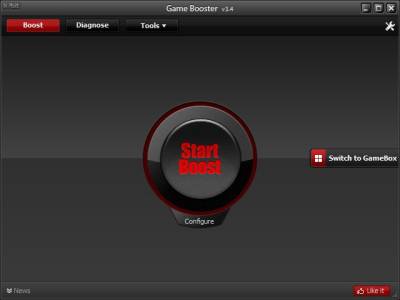
Iobit Game Booster is a free Windows program which will speed up your computer by stopping unwanted background tasks from using your CPU, and RAM resources while you play PC Games, web browser games, and other PC activities. Game Booster Pro is not just for gaming. You can use it to speed up your PC when you use it for other PC tasks like video editing, image editing, web browsing, and office work.
When I use Game Booster, I notice games load faster and run smoother with less video slowdown on my Windows 8.1 desktop computer with a Dual-Core 1.86 GHz CPU, 1GB of RAM, 320GB hard drive, and a Nvidia GT 620 1GB video card. I sometimes also use Game Booster when my computer is feeling slow, and needs a quick boost by stopping un-needed programs and services, so I have more free RAM, and CPU resources for doing other stuff like browsing the web,
Game Booster is very easy to use. I just need to use my mouse to left click on the Start Boost button on Game Booster to start boosting the amount of free RAM, and CPU my computer have. It is best to have more free RAM, and CPU on your PC to speed up game load times, and gaming performance when playing games. [continue reading…]
Tagged as:
computer gaming,
Game Booster,
iobit,
make pc games faster,
pc gaming,
Windows,
windows gaming
by Johnson Yip
on June 4, 2014
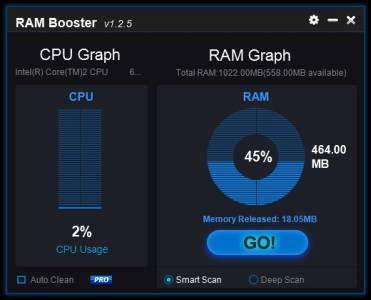
Anvisoft RAM Booster is a free RAM booster App which will increase the amount of free RAM which your Windows computer have by running a Smart or Deep Clean on your RAM. RAM Booster is a good program to have to monitor the amount of free RAM, and CPU resources have, and for cleaning your RAM to free up more RAM. It is great for older, slower, and cheaper computers, laptops/netbooks, and tablets running Windows with 1-4GB or less RAM where it can be very slow when 80% of the RAM is being used.
I use Anvi RAM Booster on a slower Windows 8.1 computer with a dual core 1.8 GHz CPU, and 1GB of RAM, and this programs help me free up RAM when my PC is running low on RAM.
Having more free RAM/Memory on your computer would make running programs faster especially big programs like web browsers, office suites, and games which sometimes use a lot of free RAM to run smoothly. [continue reading…]
Tagged as:
anvi ram booster,
anvisoft,
booster,
free Windows ram,
memory,
ram,
ram booster,
windows ram booster