by Johnson Yip
on October 31, 2014
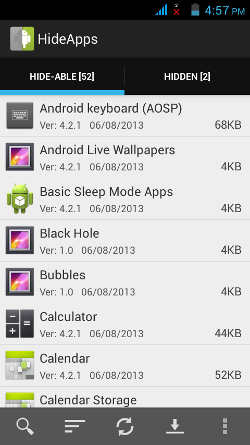
Disable Bloatware – Hide Apps is a simple to use App for disabling un-needed System and Pre-installed Apps in Google Android. I like its easy to use user interface, and the on-screen messages for teaching me how to disable apps, and uninstall updates once the app’s properties page has launched. It is only 793k in size which is less than a MB, so it uses very little storage space.
Hide Apps is an easy to use app which scans your device for Hide-Able Apps which can be disabled with this App, and it also show you which apps which you may already have hidden in the Hidden section. Hide Apps does not require you to root Google Android to hide apps. Hide Apps is safe to use because it uses Google Android’s App properties page to help you disable apps. Hide Apps is a launcher for disabling apps which you can disable with Android’s built-in App properties program where you can disable apps, uninstall updates, clear data, clear cache, and uninstalled apps which you installed yourself. [continue reading…]
Tagged as:
bloatware,
google android,
hideapps,
pre-installed apps,
system apps
by Johnson Yip
on October 30, 2014
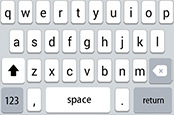
I use Classic Keyboard on my Google Android tablet because it runs fast, is easy to use, and is only 1.8 MB in size, so it uses very little space on Google Android storage drive on smartphones and tablets.
The keyboard starts up fast after I unlock Android, and tap on a text box after my device has finish turning on. The keyboard also shows up pretty fast, and hides fast when I press the hide button, or when It automatically hides when I am done entering in a website address on a browser, and pressing the return/enter button on the keyboard. Classic Keyboard app also does not seem to crash, slow down Google Android, or have long waiting times like some other keyboard apps I tried, so using this keyboard may make your device faster, and use less RAM and CPU resources because this keyboard does not use much RAM, and CPU resources in my experience. [continue reading…]
Tagged as:
classic keyboard,
google android keyboard,
keyboard,
keyboard app
by Johnson Yip
on October 28, 2014
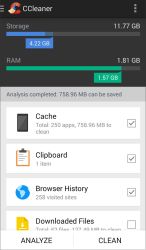
CCleaner by Piriform is a free simple to use system utility app for Google Android. CCleaner for Android is made by the same company which makes the popular CCleaner disk cleanup system utility program for Windows, and Mac. I like the flat, and easy to use user interface which is easy to check, and clean by hitting the clean button. CCleaner is also only 2.2MB in size, so it is very small, and uses a small amount of storage space on your device. CCleaner starts up pretty fast after tapping the shortcut icon on my homescreen, and also runs scans, and clean up fast as well. [continue reading…]
Tagged as:
CCleaner,
google android,
mobile,
mobile app,
piriform,
system utility app