by Johnson Yip
on November 4, 2014
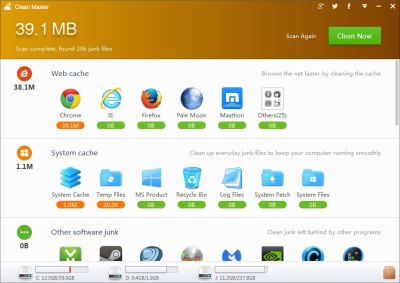
Clean Master for Windows PC is an easy to use free disk cleanup utility for Windows.Clean Master for Windows is made by the makers of the popular Clean Master for Google Android which cleans up cache, junk files, and boost the speed of mobile devices running Google Android as its operating system. Cleaning out junk files with Clean Master would increase the amount of free space which you have, so you can install more programs, and store more files on your Windows’ drive. Having more free space, could also make Windows faster because Windows needs at least 20% free space to defrag your hard drive to make it faster. Virus, spyware, disk, and other scans will also scan faster because it does not need to scan as many files after you do a disk clean up with Clean Master for PC.
I like the easy to use modern user interface which because the buttons, and icons are big, and there are subtitles on the icons and buttons to make using Clean Master simpler. The storage drive line graphs at the bottom of Clean Master are useful for seeing how much free space my computer’s storage drive have.
Clean Master runs pretty fast, and is very stable. The Disk clean up scans, and clean up times are pretty fast because they take only a few seconds most of the time. It has never crashed, or freeze when I use it on my computer. [continue reading…]
Tagged as:
clean master,
clean master for pc,
Cleaner,
disk cleanup program,
registry cleaner,
Windows
by Johnson Yip
on November 3, 2014
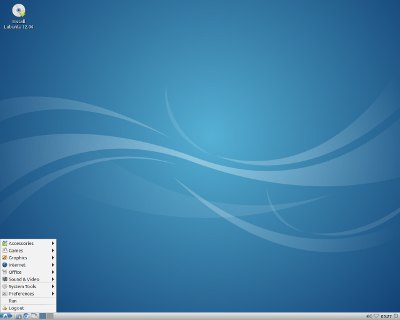
Lubuntu 14.10 is a Ubuntu Linux based operating system for Desktop and Laptop computers. It is also free and open source, so using it won’t cost any money. One of the main reason to use Lubuntu 14.10 is that it runs quickly even on very old computers with Single, and Dual core 1 GHz CPUs, 512MB-1GB of RAM, 5GB of storage space on your hard drive, and onboard video or slower video card. I previously used Lubuntu 14.04, and I updated to 14.10 with the Software Updater. I just need to press the upgrade button on Software updater, and occasionally press a few buttons on the updater windows during the update process which took about an hour.
Lubuntu uses the Lightweight X11 Desktop Environment (LXDE) which is lighter than Gnome, Unity, KDE, and other desktop environments for Linux. After logging into Lubuntu 14.10 64bit, Lubuntu only uses about 200MB of RAM, and very little CPU resources according to its Task Manager program. I can use Lubuntu for many hours without it slowing down in my experience. The low system resources usage of Lubuntu should also help save your battery life, or save power because of the lower RAM, and CPU usage of Lubuntu which helps your computer use less power because of lower RAM, and CPU usage. A computer running Lubuntu should also run cooler because its CPU, RAM, hard drive, and video card are not running at its full power, so the computer’s parts will give off less heat. [continue reading…]
Tagged as:
desktop,
laptop,
linux,
lubuntu,
lubuntu 14.10,
operating system,
ubuntu,
ubuntu linux
by Johnson Yip
on November 1, 2014
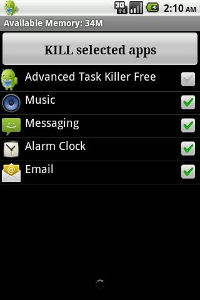
Rechild Task Killer also known as Cleanoid is one of the smallest file sized Task Killer apps for Google Android. It is only 56K in size which is smaller than the size of some text files, so you can download and install it on your device in seconds. Task Killer also loads up pretty quickly after tapping on the Task Killer shortcut icon on Google Android’s home screen.I like the simple black, and gray theme of Task killer because it is very simple, and clean to look at, and it is fast to use.
A Task Killer is an app which stops background apps like apps which you previously open like web browsers, office suites, social networking apps, and bundled system apps also called bloatware or shovelware from running in the background which can make Android load and run games and apps better because it has more free RAM, and CPU cycles after you killed apps from running. Stopping Background tasks from running could make your battery run longer before you need to charge it because background apps are no longer using up RAM, and CPU resources in Google Android once you kill them with Task Killer. Your phone’s battery, and case may also run less hot because it is using less power to keep background apps a live. [continue reading…]
Tagged as:
android,
kill background apps,
make google android faster,
rechild task killer,
stop background apps,
Task killer