Doorways launcher for Google Android is a very fast basic launcher app for launching apps in Google Android 1.4 and up. It uses very little CPU, and RAM resources in Google Android because it is mostly text based, and don’t have un-needed features and settings. It generally uses 10-20 MB of RAM when I check its RAM usage in Google Android settings > Apps > Running Apps > Cached Processes.
Doorways Launcher is a great launcher for older Google Android smartphones, and tablets, or users who want to save battery life, and make their device run faster by using a very lightweight launcher. It is also only 284K in size, so it downloads, installs, and runs very fast because of its small size. It also uses very little storage space.
Doorways launcher has small dock which you can add app shortcuts with icons to by long pressing on an App text shortcut, and telling it to add the shortcut to the dock. To remove an App from the dock, you need to long press the icon, and choose to remove it from your dock. The Dock can also hold a lot of shortcuts. You can scroll the dock horizontally to see more app shortcuts if you use all your horizontal screen space by adding a lot of shortcuts to the dock. Removing all the shortcuts in the dock will hide the dock at the bottom, and may make the launcher even more light, and faster because there are no icon image shortcuts on the bottom row dock.
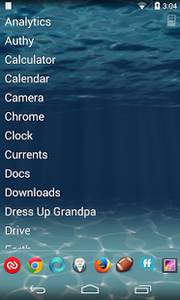
Doorways Launcher displays all its text apps shortcuts on your device as a vertical white text list where each app gets its own line to display its name. The white text is easy to read on non-light color background wallpapers, Scrolling up and down the list is pretty smooth, and there are no slow down problems when scrolling the app list up and down. I can also hide an app, unhide all apps rename an app on the launcher, add app to dock, and uninstall apps from Doorways launcher by long pressing on an App shortcut on Doorways launcher.
Doorways launcher also has a search/filter tool when you click the Doorways icon on the top right. The search/filter feature lets you search for apps installed on Google Android with keywords in the title of your apps. Searches on Doorway launcher happen quickly in real-time as you type in the Search Filter textbox, so you do not have to wait for the search to finish like an website search engine. You also do not need to click enter, or search to search because searches start as you type in the filter search box. If you want to hide the search box to get back a line of screen space, you need to click on the Doorways launcher again.
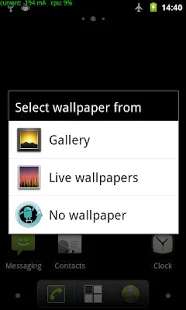
To change the wallpaper on the launcher, you need to tap on the wallpaper shortcut on the top right of the launcher. If you do not see the wallpaper icon, and search box, you need to click on the door icon on the top right to make the search filter box, and wallpaper icon appear.
Doorways Launcher is a fast, basic, simple, and lightweight Google Android Launcher which uses very little RAM, and CPU resources, so it is great for older devices, and users who need a lot of free RAM, and CPU resources for playing mobile games, watching HD video, and other power hungry tasks where having more free RAM, and CPU resources make apps run faster. Doorways launcher also uses less battery power because of its light CPU and RAM usage.
You can download Doorways Launcher at Google Play at https://play.google.com/store/apps/details?id=com.ape.apps.doorways