by Johnson Yip
on January 3, 2015

Sometime online videos from YouTube slow down, stutters, or buffer a lot when you watch them on a slower computer like an older desktop PC, laptop,or tablet because the computer does not have enough RAM, its CPU and video card is too slow to handle playing videos online.
If you are on a slower internet connection, closing other programs, browser tabs, and apps could make online video load faster because a lot of programs and sites these days sometimes use your internet connection to check for updates, auto-play video and sound, and do other tasks. Closing tabs, and programs which you are not using will free up bandwidth which would make videos run smoother. Closing unused programs, apps, and Windows will also free up system resources like RAM, and CPU resources which should make video sites perform better.
Some internet service providers also limit the speed of online video streams, so using a VPN (virtual private network) could increase the speed of online videos by hiding online Traffic from your ISP. But, some ISPs also slow down VPN traffic, so using a VPN can also make online videos download slower if your VPN is being slowed down by your ISP, or your VPN provider is slowing down your traffic which is more common for free VPN services.
Picking a local VPN server in your country, or close to your country may also speed up video download times because the video may download a video from a closer video server to your location.
[continue reading…]
Tagged as:
make online video faster,
make video buffer less,
online video,
streaming video,
video buffering,
youtube
by Johnson Yip
on January 2, 2015

Disable Youtube™ HTML5 Player is an extension/add-on for Google Chrome which turns off the HTML5 video player in Google Chrome.
The Adobe Flash video player for YouTube would replace the HTML5 video player once you install Disable Youtube™ HTML5 Player extension in Google Chrome. This extension also works for Google Chromebooks which uses the Chrome browser as its operating system. [continue reading…]
Tagged as:
Disable Youtube™ HTML5 Player,
Google,
google chrome,
Google Chrome add-on,
google chrome extension,
html5,
html5 video,
web browser,
youtube
by Johnson Yip
on January 1, 2015
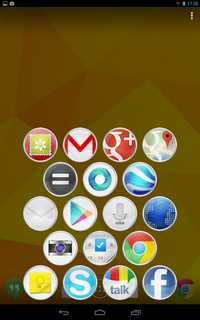
Slide Launcher is a Google Android launcher which shows app shortcuts which you added to Slide Launcher when you slide your finger up from the Home button on Google Android’s home screen. You can also make shortcuts to phone, and direct message people on your contacts in Android if you use Slide Launcher on a smartphone. Slide Launcher runs very quickly, and does not use any CPU, or RAM when it is not running unlike other launchers which are always running in the background using system resources like RAM, and CPU which can slow down your device, and use up more battery life. The low system resource usage of slide launcher will also mean it will use less battery power. Its download size is 1.6MB, so it uses very little storage space compared to other launchers which sometimes can use 30MB or more space . Slide Launcher shows up in only a second or less after sliding my finger up from the home button. I can also launch Slide Launcher when I use other apps like a web browser, so I do not have to be at the Homescreen to launch Slide Launcher.
Slide Launcher is like the Windows Start menu where you can open it from your desktop, or while you are using another non-fullscreen program like a Word Processor, and web browser.
Slide Launcher is a good launcher to use if you use a very basic low system resource usage launcher like Null Launcher, or Terminal command line based launcher where they run very lightly, but can’t launch apps, or you need to type a command line to launch an app. [continue reading…]
Tagged as:
google android,
google android homescreen,
google android launcher,
launcher,
slide launcher