Kodi.TV which was called XBMC is one of the best free Home Theater media player Software which works for many different operating systems like Windows, Linux, Mac, iOS, Google Android, Raspberry Pi, and other computer platforms and operating systems. Using Kodi is a cheaper alternative than buying a settop box or DVR with custom software, and hardware because Kodi is free, and can run on a lot of cheaper devices like the $35 Raspberry Pi, and slower Linux and Windows based computers with operating systems like Ubuntu and Lubuntu which can still run smoothly on older computers with a single to dual-core CPU, older video card, and 1GB of RAM compared to other operating systems which need a faster computer with 4GB of RAM, a faster video card, and a faster CPU to run smoothly. Kodi can probably even run well on older Windows 7 computers from 2012 and cheaper Windows 8.1 with Bing, and Windows 8.1 computers like those $99-199 Windows computers and tablets with Intel Celeron and Atom based dual-quad core, 1-2GB RAM, onboard Intel HD graphics, and 16-32GB flash storage.
Installing Kodi on computers, and mobile devices like tablets and smartphones is simple. You just need to run the Kodi installer file, which you download from Kodi’s website, to install it on your PC or mobile device which runs Windows, Linux, Mac, iOS, and Google Android.
If you use Kodi on the Raspberry Pi $35 mini PC with Raspbian Jessie Linux, it is very easy to install in my experience. Read my guide on how to install Kodi on Raspbian Jessie Linux for the Raspberry Pi to learn how to install, run, and use Kodi on Raspbian Jessie.
Opening, and running Kodi is simple as well since you just need to click on the Kodi desktop shortcut icon to open Kodi. Most commands in Kodi can be done on a mouse, and keyboard, and does not require any special training to learn how to use. In my experience, it took me less than an hour to learn how to use Kodi, and change settings related to sound, video, add-ons, media playback, and changing the clock.
There are also customize Linux based operating systems like OpenElec, Raspbmc (Raspberry Pi only), and KodiBuntu which only run Kodi, and Linux as the backend operating system to save space, and run faster by not bundling un-needed programs like LibreOffice, Firefox, and other programs on the operating system. Using OpenElec, Raspbmc, and KodiBuntu is better on computers with very slow hardware on older and slower computers like the Raspberry Pi Model B, or a computer or laptop from the Year 2008 or older. With customize Kodi operating systems, you also save some time because Kodi is pre-installed within the operating system after you install the OS on your storage device for your PC or mobile device.
I use Kodi.TV on the Raspberry Pi model B micro computer with a single core mobile ARM 700MHz CPU, and 512MB of RAM. I also use Kodi on a Windows 8.1 and Lubuntu Linux dual-boot desktop computer with a Intel Core2Dou 1.86 GHz dual-core CPU, 3GB of DDR2 RAM, Nvidia GT 620 1GB video card, and 320GB hard drive. Kodi runs okay on Windows 8.1, but it runs faster on Lubuntu 14.04. Kodi runs okay on my Asus Nexus 7 2012 Google Android 5.0 Wi-Fi tablet with a Nvidia Tegra 3 1.3 GHz Quad-core CPU, 1GB RAM, 16GB of storage.
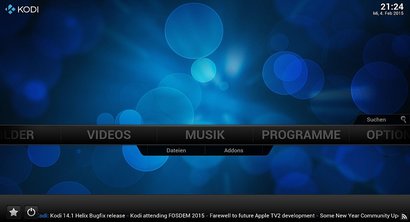
If you use Windows, Google Android, Linux, and slower devices, I recommend you close your other programs like games, web browsers, and office suites before you open Kodi since other programs running in the background can use up a lot of RAM, and CPU cycles which can make Kodi, and your PC run slower. Disabling the RSS feed in the user interface settings for Kodi could also make Kodi slightly faster by not having Kodi download new RSS feeds to the bottom of Kodi’s dashboard. There are also custom skins for Kodi which are more lightweight and simple to make Kodi run faster.
Kodi runs well at playing back most kinds of video, music, and picture files like mkv, divx, avi, wmv, mov, mp3, mp4, wma, ogg, flac, wav, jpeg, gif, png, and bmp on my PC, the internet, and home network when I tested Kodi on different operating systems, and devices. I haven’t found a media file on my PC which Kodi can’t open yet.
Kodi also supports album, and movie art for supported videos, and music files with artwork. Kodi.TV plays media very smoothly, and rarely slowdowns or stutter even when I use it to playback HD video from the internet, a USB flash drive or hard drive, and files on my hard drive on my PC.
[continue reading…]