by Johnson Yip
on March 30, 2015
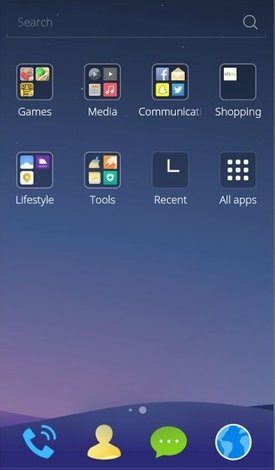
CM Launcher is a fast, lightweight, simple, and secure homescreen launcher for Google Android smartphones. Its download size is about 1 MB in size, and uses very little CPU, and RAM on Google Android, so it won’t slow down Google Android, Apps, and games because it will not use a lot of RAM, and CPU resources when running on a Google Android smartphone.
CM has a RAM Boost Homescreen Widget which shows you the amount of Free RAM on your device, and let you Boost your RAM to free up more RAM for faster performance. All you need to do is tap on the Boost Widget or Boost in the status bar app for CM.
CM is easy to install from Google Play, and it is easy to use as a launcher. I like that CM Launcher has a recent Apps widget, and the All Apps Widget which display apps in Alphabetical order. Apps on the homescreen are organized by categories like media, photo, video, etc makes finding apps easy to find to launch with CM Launcher. [continue reading…]
Tagged as:
cm,
cm launcher,
google android,
google android launcher,
Homescreen Launcher
by Johnson Yip
on March 27, 2015
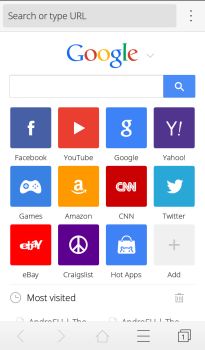
CM Browser is a nice lightweight fast web browser for Google Android smartphones and tablets. It also has a lot of useful security features which will keep you safe from viruses, and online scams with its malicious & Fraud protection, which warns you when you visit dangerous website, and its #1 antivirus engine rated by AV-TEST will scan downloaded APK files for viruses. It is secure, but you do not need to change any settings, or additional add-ons to activate the security features. You just need to install it on your device, and use it to browse the web safely on its web browser.
CM Browser is made by Clean Master which is one of the most popular disk clean up, security, and system utility apps for Android.
CM Browser is around 1MB in size, so it should run very fast even on older and slower phones. It has preloading built-into its web browser to make browsing on CM Browser very fast in my experience when I use it in Google Android. CM Browser launches in seconds, opens websites quickly, and rarely crashes or freezes when I use it. Using it to play full screen video on online video sites like YouTube seems pretty fast when I watch online video on CM Browser.
[continue reading…]
Tagged as:
antivirus,
clean master,
cm browser,
google android,
mobile web browser,
web browser
by Johnson Yip
on March 26, 2015
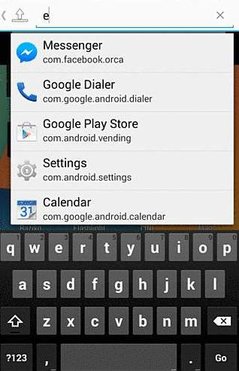
Text Launcher is a simple Google Android App Launcher which can launch apps by searching for them with text which you typed on your Google Android keyboard. Text Launcher only searches for Apps which you can launch by clicking on an app’s shortcut icon form the list of results like a search engine. It is not a homescreen launcher replacement, but it can be used to launch, and search for installed apps to launch with Text Launcher. This Launcher could make launching apps easier for Google Android keyboard and mouse users like people who use a Google Android laptop or desktop computer where the keyboard, and mouse/touchpad is the main or only way to control a laptop, or desktop without a touchscreen.
I can use voice search to search for Apps to launch with Text Launcher on tablets, or smartphone has a microphone, and have a voice recognition app like Google Voice installed on Google Android, or the voice recognition feature comes bundled with the keyboard app.
Text Launcher launches in a few seconds after tapping on its shortcut icon on the homescreen. It runs pretty quickly on my Asus Nexus 7 2012 Google Android 5.1 Lollipop Wi-Fi tablet with a Nvidia Tegra 3 Quad-Core 1.3 GHz CPU, 1GB of RAM, and 16GB of storage. Text Launcher rarely freezes, or crashes in my experience when I use it in Google Android to launch apps with text searches for the app I want to launch.
The searches for installed Apps to launch in Text Launcher take about a second after typing in the name of the app, and pressing the OK/Go button on my keyboard. After I launch the app by tapping on it from the search results, a notification on the bottom pops up showing me the name of the app, and its package name. [continue reading…]
Tagged as:
google android,
google android launcher,
Homescreen Launcher,
launcher,
Text,
Text Launcher