by Johnson Yip
on November 10, 2013
Smart Launcher Free is an alternative fast lightweight homescreen launcher/desktop for Google Android. A Launcher is the homescreen which is the screen you first see when you unlock your phone after you turned it on. One of the great things about Google Android is that you can install alternative launchers if you do not like the default launcher for Android, or Touch Wiz on Samsung Android phones.
Smart Launcher has been one of the fastest, and easiest to use Google Android Homescreen launchers which I ever use on my Google Android tablets. It is also very customizable, so I can change the look of Smart Launcher in a few minutes. It also does not slow down my tablets, and drains my battery like other launchers I tried. [continue reading…]
Tagged as:
google android,
google android launcher,
home screen,
launcher,
mobile,
mobile operating system,
smart launcer,
smartphone,
tablet
by Johnson Yip
on November 2, 2013
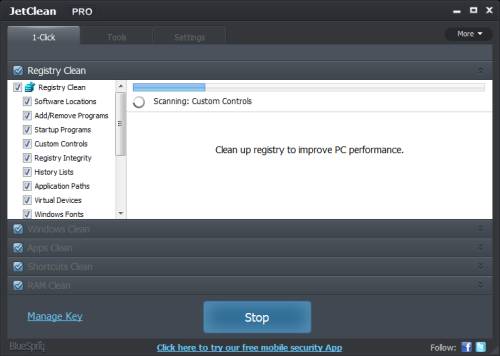
JetClean is a free system utility software program by Bluesprig which scan Windows for junk files, un-needed registry keys, broken shortcuts, history files, and optimizes RAM/Memory for faster computer performance to make games and programs run faster, and more stable.
I found using JetClean saved me hundreds of MBs of space by getting rid of junk files from Windows 8, and programs like web browsers which can have hundreds to thousands of MBs of junk files. It also runs quickly on my Windows 8 computer which only has a Intel Dual Core CPU, 320GB hard drive and 1GB of RAM.
It is easy to use. I just need to click scan, and repair. For more tech-savvy users, they can check, and uncheck items they want to clean. [continue reading…]
Tagged as:
Bluesprig,
disk cleanup,
JetClean,
make Windows faster,
registry cleaner,
system utility
by Johnson Yip
on November 1, 2013
Sometimes Google Android Jellybean 4.3 slow down for a few seconds after it starts up, and the icons/short cuts disappear for a few seconds on the home screen, and my tablet becomes unresponsive when loading apps, or trying to load apps after start up. I think it is caused by Apps which start up, and have performance problems where it slows down Android 4.3 after start up.
I think I fixed it by uninstalling Facebook, Facebook Messenger, and a few other third party apps. I now mostly use the web browser version of Facebook at M.Facebook.com which is good enough for sending a quick message, browsing the news feed, etc. But, I notice Facebook Apps used the most RAM according to Clean Master’s Task killer application. Twitter, Pinterest, and Tumblr also have mobile versions of their website, and there are sometimes third party app developers which make apps you can use to access different social networks, and services, but use less RAM, and CPU cycles than the official app from Facebook, Twitter, and Tumblr.
I also used Clean Master to see which apps start up during start up, and uninstalled the third party apps like Facebook which use a lot of RAM compared to other Apps like Hangouts, Gallery, Chrome, etc which also start up when I turn my Android tablet on. Running the Task Killer App in Clean Master once every few hours or when your device feels slow may help make Android feel more responsive by stopping background tasks.
[continue reading…]
Tagged as:
google android,
make android faster,
make slow android performance,
mobile,
smartphone,
tablet