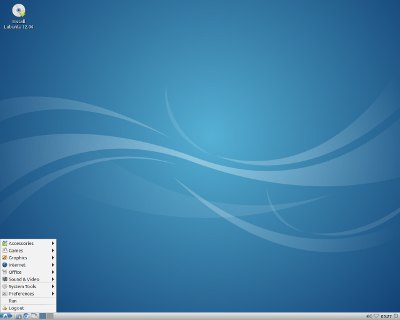
Lubuntu 14.10 LTS Trusty Tahr is the latest operating system from Lubuntu for desktop, and laptop computers. It is great for older computers with slower CPUs like Single and Dual-Core CPUs under 2GHz in speed, less RAM like 512MBs of RAM, onboard video, and smaller hard drives in the 20GB or smaller range.
Lubuntu is a free PC operating system based on Ubuntu Linux. But, Lubuntu uses the LXDE lightweight desktop environment, and comes with faster lighter programs like Abiword which run faster on slower and older computer compared to LibreOffice which uses more hard drive space, and is not as fast on older PCs. The LXDE desktop also use less RAM, and CPU resources, so it would extend your battery life on your laptop, or uses less power from your home’s power. In my experience, Lubuntu uses 155MB of RAM, and 1-2% CPU cycle resources after I start up my computer in Lubuntu 14.10.A computer will also run more cooler because it is not working as hard because of the low CPU, low RAM, and low video card usage, so your computer may last longer because it does not get as hot, and the fans don’t spin as fast causing them to wear out faster. A computer may also run quieter because newer computers and laptops don’t spin up their cooling fans as fast when the computer is not running very hot.
Lubuntu also is safer to use than other operating system because there are no viruses which easily infect Lubuntu, and the programs in the Lubuntu Software Center are safe to use.
The low storage requirements of Lubuntu would make it a good operating system to install on a cheaper SSD solid state hard drive which are 16-32GB size range. The benefits of a SSD is no noise, less heat, lower power usage, less heavy, and it is more durable because there are no moving parts.
The LXDE desktop is also great for keyboard and mouse computers which do not use a touchscreen to use programs because the LXDE desktop environment in Lubuntu has features like a taskbar, application launcher similar to the startmenu in Windows, and resizeable windows which can be easily closed, maximized, minimized, and resized. Lubuntu is the best Windows Alternative operating system based on Linux because Lubuntu is simple to use, runs faster than Windows Vista and above, and it crashes less.
I also like that there are no visible changes to the Lubuntu user interface, and settings, so I don’t need to learn how to use Lubuntu 14.04 LTS because I already know how to use Lubuntu 13.10, and the user interface is similar to Windows, and other desktop operating systems like Linux Mint.
The latest version of Lubuntu runs fast on my older 2007 computer with a 1.86 GHz Dual-Core CPU, 1GB of RAM, 320GB hard drive, onboard sound and Nvidia GT 620 1GB video card. The startup time for Lubuntu takes less than a minute after I turn on my computer. Programs also start very quickly when I launch the from the desktop, or Applications menu on the bottom left of the desktop. I can use Lubuntu for hours, and it still runs very fast. Programs like web browsers, video media players, music players, and office suites rarely crash or freeze in Lubuntu 14.10. Lubuntu is also pretty good for gaming because of its low system requirements. Minimizing, maximizing, restoring, and closing programs and files in Lubuntu is pretty fast. Scrolling up and down on web pages, documents, etc is also pretty smooth. Watching HD video on Lubuntu plays pretty good, too. Listening to music/audio in Lubuntu sounds good as well even with my onboard soundcard. [continue reading…]