by Johnson Yip
on May 20, 2014
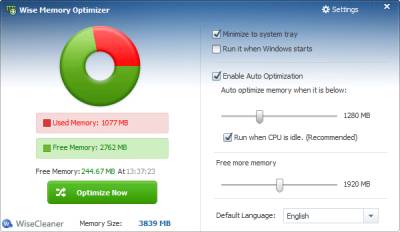
Wise Memory Booster is a free small program which automatically free up your computer’s used RAM when you use Windows. You can also click the Optimize now button to free up RAM. In my experience, I can free up 100-200MB or more MB of RAM out of 1024MB of RAM which I have installed on my Windows 8.1 desktop PC. After optimizing my RAM, Firefox 29 web browser only uses about 120MB of RAM instead of 400MB or more RAM. Also, Optimizing my RAM with Wise RAM Booster does not slow down my computer when it is optimizing, so I can continue to use it. Optimizing my RAM only takes a few seconds. [continue reading…]
Tagged as:
defrag ram,
free up RAM,
memory,
optimize ram,
ram,
Windows,
wise ram booster
by Johnson Yip
on May 18, 2014
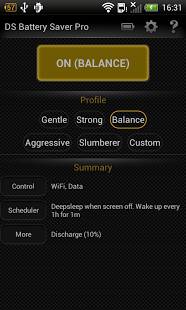
Deep Sleep Battery Saver is a free simple to use battery saver app for Google Android. Deep Sleep will turn off your Wi-Fi, data, Bluetooth, and stop apps from running when your screen is turned off on your Android phone or tablet. Occasionally, it will wake up to download e-mail, and notifications, but you can set it to not wake up Wi-Fi and 3g/4g data to save even more power.
The User Interface is pretty easy to use. You can turn the App on and off from Deep Sleep, and also change settings from Deep Sleep main program. There is also a summary of what each mode does on the app.
Deep Sleep runs pretty quickly, and rarely freezes in my experience.
I like the modern looking Dark user interface because it looks very clean, and modern looking. The battery icon for Deep Sleep in the notification status bar on android is useful for seeing the percentage of power I have left on my battery before I need to charge it. [continue reading…]
Tagged as:
app,
battery,
battery saver app,
deep sleep battery saver,
google android,
mobile app,
system utility
by Johnson Yip
on May 13, 2014
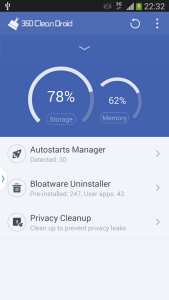
360 Clean Droid is a simple to use System Utility App with millisecond boosting technology, advanced trash cleanup, and privacy cleanup features for Google Android. It can cleans GBs of junk files off your phone freeing up a lot of free space, and also boost your memory for faster performance on your phone. It is very easy to use, and only takes one tap on the clean button, and a few seconds to clean and boost your mobiles memory. There are also easy to use tools for removing unwanted bloatware, and stopping startup programs which slow down your mobile.
It also protects your privacy for scanning for private data which is safe to delete like chat logs, and search engine searches. After installing the App from Google Play, and launching it, it starts a scan to boost memory, and remove junk files. You can click clean, or select which junk files you want to keep, and boost your memory. Most tasks like cleaning, and uninstalling apps just need one tap of a button.
The scan and clean times are very fast because it only takes a few seconds to complete. I like the nice looking, and easy to use user interface for 360 Clean Droid. The Chart for showing used storage, and used memory is useful to seeing the storage , and ,memory usage of my tablet.
[continue reading…]
Tagged as:
360 Clean Droid,
app,
Cleaner App,
google android,
memory booster app,
mobile apps,
system utility