by Johnson Yip
on July 4, 2014
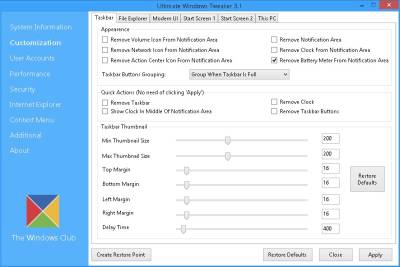
Ultimate Windows Tweaker 3.1 is a free Windows tweak utility to tweak Windows 8-8.1 easily by just checking check boxes, moving slider buttons, and choosing options from drop down menu. It is a lot safer, and easier to use than using a Registry Editor or Windows command prompt which is difficult for most computer users. It is a great tool for optimizing Windows to run faster, so PC Games, web browsing, and using Windows is faster. It is also safer than using other programs to tweak Windows because there are description, restore default, and create system restore which makes the chance of messing up Windows a lot less unlikely compared to other Windows tweakers. There are also a lot of tweaks to make Windows 8-8.1 easier to use like disabling the lock screen, and making Windows start to desktop instead of the fullscreen Start Screen after you logged into Windows with your user account.
It is amazing that Ultimate Windows Tweaker has over 170 tweaks for changing Windows settings which will make Windows faster, look better, easier to use, crash less, and improve security of Windows 8.
Ultimate Windows Tweaker for Windows 8-8.1 is only 340 KB in file size and has over 170 tweaks for Windows 8. It also does not require installation since you just need to unzip the zip folder to extract it, and run it.
Ultimate Windows Tweaker also won’t slow down Windows by starting during Windows Startup like other system utility programs which startup during Windows login, and adds an automatic service to the services section of Windows.
[continue reading…]
Tagged as:
microsoft,
operating system,
Ultimate Windows Tweaker 3.1,
Windows,
windows 8,
windows tweaks
by Johnson Yip
on June 30, 2014
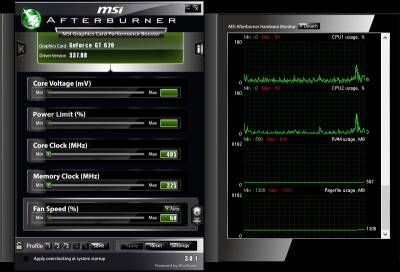
I use MSI Afterburner 3.01 which is a free overclocking software to overclock my Nvidia GT620 1GB videocard’s GPU core clock, and memory clock, so my PC games have faster video frame rates like 40-60 Frames per second. Having higher frame rates will make video on games look smoother, and have fewer slowdown problems like slow frame rates which caused the video to slow down, or stutter. You may also be able to set your video quality on PC Games to a higher video setting like low to medium, or medium to high video quality settings after you overclocked your video card.
MSI Afterburner been pretty stable, and reliable at overclocking my video card, and my overclocks don’t cause my computer to crash, or overheat.
I like the dark modern theme for Afterburner. It is easy to find the settings like core clock, and memory clock speed I want to change.
You can also underclock your videocard to save a little bit of electricity/power, and make your video card run cooler when you are doing less video intensive tasks like browsing the web, office work, e-mail, watching standard definition video, etc. [continue reading…]
Tagged as:
msi,
msi afterburner,
overclocking,
video,
videocard,
videocard overclocking,
Windows
by Johnson Yip
on June 26, 2014
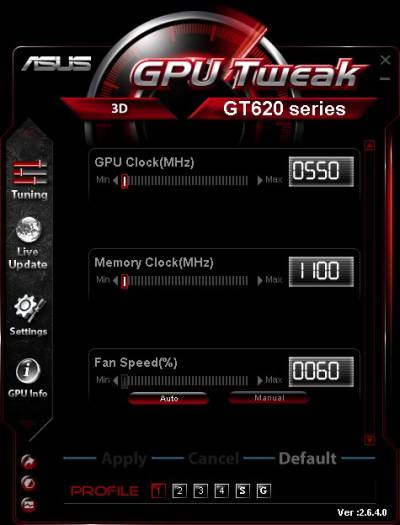
Asus GPU Tweak is an easy to use Asus video card over clocking utility program for Windows operating systems. It usually comes bundle with the drivers for Asus video cards when you buy an Asus Video card for Windows, but you can download it from Asus website, too.
Overclocking make your video frame rates faster, so video runs smoother with less or no slow down problems. After overclocking, you can set the video quality in games to the maximum quality setting and resolution, or. from low to medium, or medium to high in some games.
Overclocking can also let you use your older videocard to play newer games, so you do not need to upgrade your videocard to play the newest games.
I have been using Asus GPU Tweak 2.6.4.0 on my Windows 8.1 desktop computer with a dual-core Intel 1.86 GHz CPU, and 1GB of RAM to overclock my Asus Nvidia GT 620 1GB video card when I play 3D games like Gameloft Asphalt 8: Airborne which I downloaded from the Windows 8 App store for free . Overclocking a video card makes playing my games more enjoyable because the video in games run more smoother, and don’t stutter, and freeze as much during intense 3D gameplay. Overclocking a video card make it possible to play my games with a slower and older video card like my Nvidia GT620 1GB card. Overclocking my video card also increase my web browsers performance, and other video card GPU accelerated programs which use the Video Processor on my video card to speed up a computer program graphics and processing like the Google Chrome, Internet Explorer 11, Firefox, and Opera web browser which now has GPU acceleration.


In my experience, using Asus GPU Tweak 2.6.4.0 to overclock my Asus Nvidia GT 620 1GB card has been pretty easy to use to overclock my videocard, and overclocks has been stable in Windows 8.1. It only takes a few seconds to overclock a video card on GPU Tweak if you know what speed you want to set the video card to, or you use one of the convenient overclocking modes like G/Gaming, or P/Power Saver presets which come bundled with GPU Tweak’s overclocking profiles. [continue reading…]
Tagged as:
ASUS,
asus gpu tweak,
make pc games faster,
overclocking,
pc gaming,
video,
video card,
video card overclocking