by Johnson Yip
on October 27, 2014
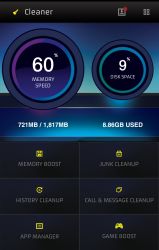
Cleaner Master Speed Booster Free is an app for Google Android which comes with a Memory Booster, game booster, junk file cleaner, history cleaner, and App Manager.
Cleaner is pretty easy to use in my experience because I just need to tap a few buttons to do tasks like boosting the memory, or games, cleaning junk files and history, and uninstalling Apps with the App Manager.
I like the dark modern theme of Cleaner. It looks very nice, and it is easy to use. It is useful to see how fast my memory speed is, how much memory is being use and the percentage of free space my device has on its dashboard.
Cleaner also opens fast, and runs pretty well.
The Memory Booster stops background apps, and services from running which should help make apps run faster because Android, and the app which you are using has more free RAM, and the CPU is also running fewer background tasks. It will also make the battery life longer because less is running in the background. [continue reading…]
Tagged as:
Cleaner,
Cleaner Master Speed Booster Free,
google android,
mobile apps,
system utility
by Johnson Yip
on October 23, 2014
Getting rid of the Navigational bar search ring when you swipe up from the home screen is simple to do, and makes Android less distracting to use because you won’t accidentally launch Google Search, and see the ring or other apps when accidentally swiping up from the home screen, or long pressing the home button too long. Disabling Google Search also removes the small transparent arrow pointing upwards at the bottom center of the lock screen, so my lock screen looks more clean.
Your device does not need to be rooted to disable the Google Search Ring on Google Android.
[continue reading…]
Tagged as:
google android,
google android search ring,
home screen,
navigational bar search ring
by Johnson Yip
on October 21, 2014
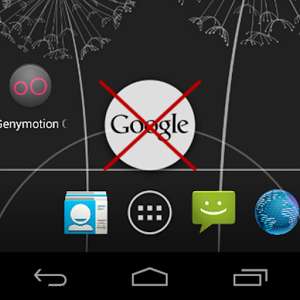
NavBar Ring Disabler is a simple app which disables Apps like Google Search, and any other apps from opening when you swipe your finger up from the on-screen home button on your launcher. You do not need to root your smartphone or tablet, so it should work on most Google Android 4.1 and up devices with onscreen system bar buttons at the bottom.
It is easy to use. I just need to install the app, and launch it. When it is launch, I press the “Disable Nav Bar Ring” to disable Google from loading when I swipe up. It can’t disable the ring from showing up, but it stops Google and other apps from loading to nothing when you swipe up from your home button on your screen. [continue reading…]
Tagged as:
disable android swipe up,
google android,
homescreen,
homescreen app,
navbar ring disabler,
swipe up