≡ Menu
Game Booster Plus

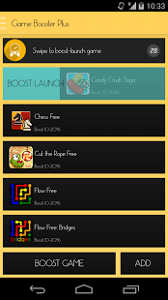
Game Booster Plus is a game boosting app which work on Google Android smartphones and tablets. It makes games run faster by freezing background programs while you use it to run games. Freezing background programs will free up RAM, and CPU resources on your Android device. Whan I use Game Booster Plus, I notice  games load faster, and I also get better frame rates, fewer dropped frames, faster video gameplay, fewer freezes, and less crashes when playing more system resources intensive games like Gameloft’s Asphalt 8 in multi-player online mode on my Asus Google Android Nexus 7 2012 tablet with a Tegra 3 CPU, 1GB of RAM, and 16GB of storage space.

Most games are boosted around 10-30% according to Game Booster Plus’s description for apps in the Game Booster Plus folder.

Using Game Booster  to stop background apps while gaming or using other non-gaming apps would also increase your battery life since some Background Apps like social networking and chat apps sometimes use a lot of battery power because they are always running in the background when your mobile device is ON.

Game Booster Plus automatically detects games to add to Game Booster Plus’s games app folder. You can also manually add games which Game Booster did not detect, and you can remove games from its app. I use Game Booster Plus as an app bookmarking tool to easily find my most used games, and apps instead of searching through the All Apps section of Android which may have hundreds of Apps which I installed, but rarely use. [continue reading…]
0 comments
Keyword Launcher Android

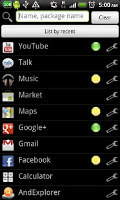
Sometimes Google Android’s default launcher, and many third-party launcher crash, and freeze during startup, and while I use Google Android. Crashing and freezing on a mobile device is very annoying because it sometimes takes many seconds to recover from a crash, or a full system restart by holding down on the ON/OFF button in Android. But, Keyword Launcher is a great launcher for slower and older Google Android based Smartphones, and tablets with a slower CPU like 700MHz Single Core, less RAM like 256MB of Memory, and low storage space like 2GB of free space. It is also a great launcher for users who want to squeeze as much free RAM, and free CPU resources out of their Google Android smartphone or tablet to make games, and apps run faster by switching to a very lightweight launcher like Keyword Launcher which uses very little system resources.

Using a launcher which uses less RAM, and CPU resources may increase your battery life because Keyword Launcher uses less RAM, and CPU resources, so it uses less power to power the RAM, and CPU.

[continue reading…]

0 comments
K-Meleon 74 Beta 3

K-Meleon 74 Beta 3 Web Browser is one of the fastest and highly customization tabbed free web browsers I ever used in Windows 8.1 on an older computer . It is also opensource like other popular web browsers like Chromium, and Firefox where the source code is available for the public for free.

Many times, I tried to change the settings in mainstream web browsers like Internet Explorer, Chrome, Firefox, and Safari for Windows to try to make it use less RAM, crash less, and work better on older computers. But, Most of the setting changes, browser tweaks, and performance add-ons I find online on blogs and forums don’t work very well where the browser use slightly less  or the same amount of RAM, and CPU resources as before the changes, but the browser still feels slow.  Plus, it sometimes take a lot of time to look for tweaks online, use the tweaks to change settings, and test to see if they work, or not.

Switching to a faster web browser like K-Meleon is a better use of my time, and it actually uses less RAM, and CPU resources where the browser feels fast compared to other Windows web browsers which are not as fast on older Windows computers. I still keep my other web browsers like Chrome, and Firefox installed to use exclusive add-ons like video and music downloaders which are not available on K-Meleon.

K-Meleon is based on Mozilla Firefox’s Gecko web browser tech. K-Meleon is built with the native Windows application programming interface for the user interface so, it uses Windows user interface. This also means that it would use less RAM, and CPU resources while running. According to Windows Task Manager in Windows 8.1, K-Meleon 74 Beta 3 is only using 24MB of RAM and 0% CPU when I open it from its desktop shortcut on the Windows desktop.

Installing K-Meleon is simple. I just need to open the installer file in the download’s folder, agree to install it, and follow the step by step instructions which is similar to installing Firefox, and other Windows programs downloaded from websites.

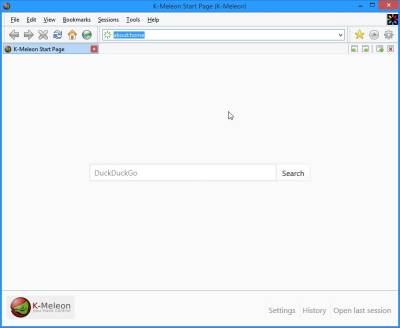
The user interface for K-Meleon 74 is easy to use, and does not use a lot of screen space. K-Meleon low screen space usage makes it a good web browser for smaller low resolution monitors on netbooks, older computers, and tablets for viewing desktop sites. There is a address bar, navigational buttons like back, forward, stop, refresh, home, and History. It also has bookmarking like other web browsers like Firefox and Internet Explorer. The familiar user interface of K-Meleon makes it easy to use for people who use Firefox, and Internet Explorer. I can also very easily change the default search engine to DuckDuckGo, Bing, or Google in K-Meleon’s search settings. There is a fullscreen mode which shows a website with your entire screen space, and hide the status bar, and navigational toolbar when I press F11 on the keyboard. [continue reading…]

4 comments